




























ADHD Planner for Professionals: A Free Printable for the Workweek
What Should an ADHD Planner for Work Include?
An ADHD planner for work should include four parts: the week’s three outcomes with focus time for each, one must-do a day, who you are waiting on and by when, and a “not this week” box. Fill it in during a 35-minute Friday review, and leave out second task lists, color codes and life pages.
Free kit in this article The ADHD Workweek Kit
You fill in a new planner on Monday. By Wednesday you have stopped opening it, and by Friday it sits in a drawer with the others. Many adults with ADHD own a drawer like that, each planner good for a week or two. I think the planner was rarely the problem. It was built for a steady week.
I also have ADHD, and living with ADHD at work has taught me how rare a steady week is. Meetings move, email arrives all day and half of what you are waiting for sits with other people. Neurodivergent adults get that week like everyone else, and a planner that assumes a calmer one fails them first. The page below is built for the week you actually have.
Key Takeaways
- The free weekly page has four parts: three outcomes for the week, one must-do a day, who you are waiting on and what is not for this week.
- Planners fail at work when they become a second task list, plan hours you do not have or go unopened after Wednesday. Fewer parts survive longer.
- A 35-minute Friday review, 15 minutes looking back and 20 planning ahead, is the habit that keeps the page open.
- When the planner slips, open it where you left it, shrink the plan and fix the one area of your week that broke.
A Free Printable ADHD Planner for Professionals: The Weekly Page
This ADHD planner for adults at work is one weekly planner page with four parts: the week's three outcomes, one must-do for each day, who you are waiting on and what is not for this week. It is undated and free to print, and it is the same page you get in the ADHD Workweek Kit.
The layout leaves out a second task list, color codes and pages for meals, moods or habits. A single planner page and a pen keep the few things that matter this week in front of you.
Print the template on US letter paper, keep a few blank copies where you plan and give it one home, on your desk, in your bag or open on screen. Pick one planner and one place. My rule for every system is that out of sight is out of mind. A list on the computer goes unopened, paper gets buried and a sticky note on the monitor turns into part of the background.
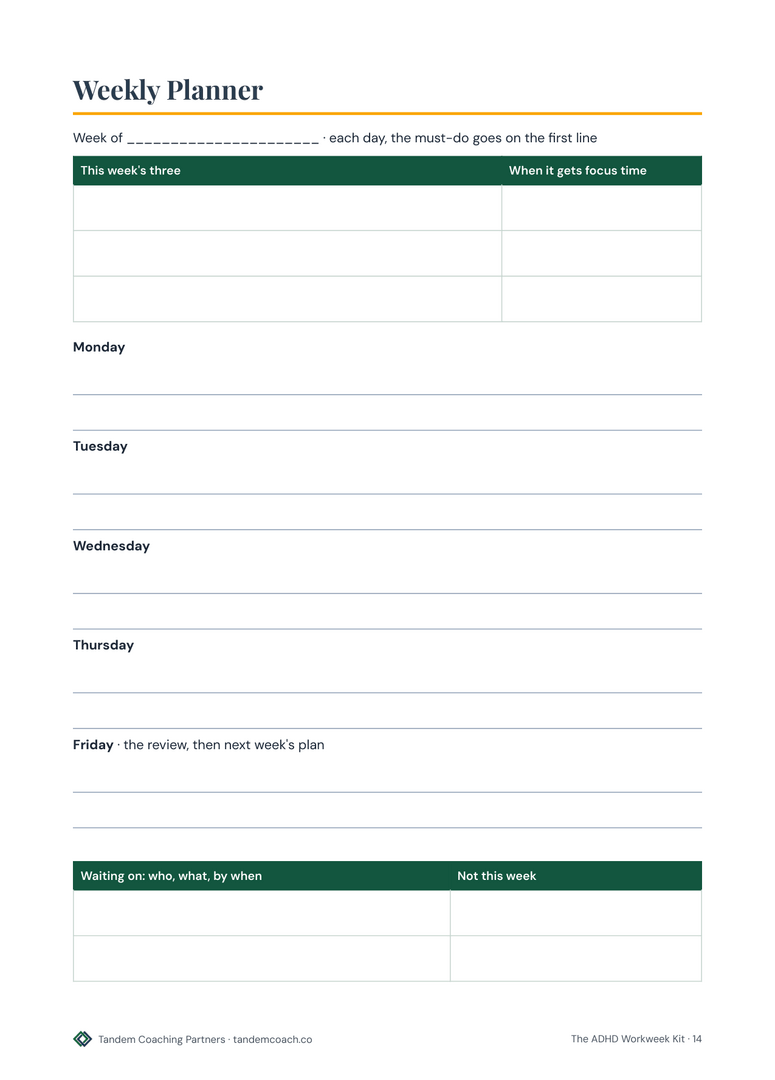
- This week's three. Three outcomes you want finished by Friday, each with its focus time.
- Monday to Friday. The day's must-do goes on the first line. Friday holds the review and then next week's plan.
- Waiting on. Who owes you what, and by when.
- Not this week. Whatever turns up mid-week and can wait, so it leaves your head without taking over the week.
Why Most ADHD Planners Fail at Work, and Five Rules That Hold
Most planners for ADHD fail at work for three plain reasons. The planner becomes a second place to keep tasks, it plans hours you do not have, and nobody opens it after Wednesday. Traditional planners assume a steady week and add more sections to hold it, which gives a hard week more to drop.
Planners marketed for neurodiversity often add mood pages, meal plans and color codes. What I hear from people with ADHD is that a new app or list works for about a month, and then one day it isn't opened again. A perfect planner with ten sections gives an ADHD brain more to choose between, and too many options make it hard to start. That is how many planners end up in the drawer.
Advice on how to stay organized usually adds structure. A planner that works in a real week cuts load first. If you use a planner at work now, test it against these five rules.
- One capture list. Every task lives there, so the planner never turns into a second to-do list that tries to keep track of everything.
- Three for the week, one a day. Anything else you finish is a bonus.
- Energy before hours. The hardest work goes where your focus runs highest, and email, admin and meetings go around it.
- Room for the week to go wrong. A 15-minute buffer after every block, part of each day left unplanned and a must-do small enough to finish on a bad day.
- A review that takes 15 minutes. Look at what happened, carry forward what matters and change one thing.
Say a customer escalation takes all of Wednesday. A full daily planner starts Thursday with a page of overdue lines, while this page still shows three outcomes with focus time left. Plan only the hours you have. ADHD time blindness at work makes them fewer than they look.
How to Fill In Your ADHD Weekly Planner on Friday
Filling in the weekly page takes about 35 minutes at the same time every week, 15 to review the week that is ending and 20 to plan the next. I'd do it on Friday afternoon before you leave, because the week is still fresh and Monday starts with a plan already on the desk.
In your first week, start at step 2. Keep your capture list beside you, whether a notebook, an app or flagged email, as long as you already open it every day. One capture point is the base of ADHD organizational skills at work.
- Review the week in 15 minutes. Answer the five Friday review prompts. Which of the three got done, and what held up the others? Where did the week break, by day and by checklist area? What are you still waiting on, and from whom? What carries into next week? What is the one change to the system?
- Do a brain dump onto your capture list. Everything open goes there, from promises to whatever is nagging at you. Nothing goes on the planner yet.
- Pick three for the week. Write each as an outcome, such as “board deck sent to the chair”, with the time it gets focus beside it. If one of the three has no focus time this week, swap it for one that does.
- Write one must-do a day. Keep it small enough to finish on a bad day. “Draft the first two pages of the strategy memo” is a must-do, and “strategy memo” is a project.
- List who you are waiting on. Every line gets a name and a date.
- Use “not this week” during the week. At the next review each item there moves to the capture list or goes.
This is goal setting for one week. The review is the habit that keeps the page open in week three, so I'd run it even after a bad week, which gives it the most to work with.
Find Where Your Week Breaks: An Executive Function Checklist for Work
Executive function is the usual term for the work of planning, starting, switching, remembering and finishing. Every job asks for it. This checklist does not measure yours. It checks the systems at work that are meant to carry that load, so less of it has to sit in your head.
Want a Score for Each Area?
The free ADHD Executive Systems Audit asks eighteen questions across the same six areas and shows which system to fix first. About eight minutes.
Read each row against a normal recent week. The area that breaks most often is where to start, and a tie goes to the area that cost you an evening. Write its first fix as Monday's must-do and check again after four weeks. When a different area comes out on top, the first fix is working.
Don't try to get organized everywhere at once. In the weeks leaders describe to me, work goes in late, a meeting gets missed, a deadline is met by cramming the night before and the list fills with yeses given too quickly. Those point to calendar and time, and to tasks.
ADHD Organization at Work: Six Areas and a First Fix for Each
| Area | What breaks | A first fix |
|---|---|---|
| Tasks | Tasks live in several places, and actions agreed in meetings never reach the list | One capture list, and every meeting ends with your actions written in it |
| Calendar and time | Deadlines arrive together, and no time is left for deep work | Two focus blocks a week, in your calendar before anyone else can take the time |
| Email and messages | The inbox is open all day, and requests get lost in chat threads | Email in set windows, with notifications off between them |
| Handoffs and delegation | Work you passed on comes back late, or not at all | A waiting-on list, with a name and a date on every line |
| Digital tools | Files and notes are spread across too many apps | One home for notes, one for files and 15 minutes on Friday to tidy both |
| Workspace | Interruptions at the desk, and papers for every project in one pile | A visible do-not-disturb signal and one tray for incoming paper |
Email windows cut the cost of context switching, the workspace row has its own guide in ADHD workspace setup for executives, and executive function strategies for ADHD leaders explains the thinking behind all six.
Block the Day Without Filling Every Hour
Time blocking gives each part of the day a job before the day starts. It fails when the blocks fill every hour and leave no time to switch. The kit's time-blocking version uses three kinds of block (focus, responsive and meetings), and each one is followed by a 15-minute buffer that takes any overrun.
Focus blocks hold the must-do and this week's three, in your best hours. Responsive blocks are two or three set windows for email, messages and the daily tasks that are not the must-do. Meetings are grouped away from your focus hours. ADHD productivity coaching strategies covers the rest of this approach to time management, and ADHD meeting strategies for executives covers the meetings.
Your Standard Week and the Daily Planner Page
Fill in the standard week once and adjust it at each Friday review. Start with two focus blocks a week, 60 to 90 minutes each, and add more once those hold for two weeks. Daily pages are optional. On the days you use one, spend five minutes in the morning on the daily planner page and put the must-do in the first focus block. A calendar reminder for the Friday review keeps the routine off your memory.
When someone senior keeps taking your focus block, put a pause between the ask and the yes. “I'll get back to you on that tomorrow” gives you time to decide. If the block has to move, move it once and say why. “Tuesday morning is when I write. Could we do 2:00?”
When Your Week Runs Through Other People
Much of a senior week belongs to other people. Decisions get made in meetings, work goes to a team and requests arrive in passing. A planner only knows what you wrote down, so it needs help with the parts other people own. Four habits close most of the gaps between your page and everyone else's week.
- End every meeting you run with the actions said out loud. Who does what, by when. Yours go in the capture list before you leave.
- Hand off in writing. One message with the outcome, the deadline, what good looks like and when you will check in.
- Use the waiting-on box as your handoff tracker. Every handoff goes on it with a date, and on Friday you check the list.
- Ask for instructions in writing. “Could you send me that in two lines, so I get it right?” works at any level.
Above a certain level the strongest fix is often someone else's time. An assistant or chief of staff who owns the calendar and the waiting-on list lets you stay on top of what others owe you, and our executive delegation framework covers the handoffs themselves.
When a fix needs your employer to change something, you can ask for it as a workplace accommodation under the Americans with Disabilities Act (ADA). The Job Accommodation Network, a free service funded by the US Department of Labor's Office of Disability Employment Policy, lists calendars and planners, checklists, written instructions and uninterrupted work time among its accommodation ideas for individuals with ADHD. Our guide to ADA accommodations for ADHD and the ADHD disclosure and accommodation guide cover how to ask.
The First Two Weeks: What to Do When Your Planner Slips
Week one usually goes well. The page is new, the week is planned and the plan is short enough to follow. Week two is where many people stop, because a Monday gets away from them, Wednesday stays blank and by Friday starting over with a new system feels easier. Plan for that day before it comes.
Week One: Run It as It Is
Use the three, the must-dos and the waiting-on list as they are. Add no highlighters, colors or second notebook this week.
Week Two: When It Slips
- Do not start the entire planner over. Open the page where you left it and write today's must-do. One line gets you back in.
- Shrink, do not add. If three for the week was too many, make it two. If the daily page went unused, drop it and keep the standard week.
- Find the leak. Name the day it slipped and what caused it, such as a task kept somewhere else or email that ate the morning. Each cause points to a checklist area, and that area gets the next fix.
- Change one thing at the Friday review, and only one.
The urge to buy a new planner peaks the day the old one slips. I'd resist it, because a fresh planner restarts the cycle of working until it is forgotten. Use your planner as it is for one more week. A slip that repeats in the same place points at a system, so look there before you blame motivation or procrastination. If the load itself was too heavy, recover from ADHD burnout first.
When it slips twice in the same place, the ADHD Executive Systems Plan is a deeper audit of the same six areas. You name the three misses that cost you most and what you already tried. You get a private PDF showing which systems fail and why, with the fixes in order, plus short check-ins over 90 days, and nothing goes to your employer.
From a Planner to a Planning System That Works
A planner holds the week you planned. The weeks that break it are the ones nobody planned, such as a reorganization, a board deck or three days of travel. What holds then is the set of systems underneath, repaired in the right order, and a planning system that works starts with knowing which one to repair first.
Start with the free ADHD Executive Systems Audit. It asks eighteen questions across the same six areas and takes about eight minutes. Once those systems hold, the planner system on top is the easy part. When the fix is in how you lead, read how ADHD executive coaching works and see our ADHD executive coaching services.
Frequently Asked Questions About ADHD Planners at Work
What are the best ADHD planners for adults at work?
The best planner for ADHD at work is the one with the fewest parts you still open in week three. Choosing the right planner means checking for four parts: three outcomes for the week, one must-do a day, who you are waiting on and a weekly review. The brand matters far less.
Is a paper planner, a bullet journal or a digital planner better for ADHD?
Any of them works if it has one home you see every day. Pen and paper suits people who forget to open an app, and a digital app suits people who live in their calendar. Choose a planner format you already look at, and keep just one. For apps, see ADHD productivity tools and apps.
Should an ADHD planner be weekly or daily?
Start weekly. The weekly page holds the three outcomes and the must-dos, and most weeks need nothing more. Add a daily page on heavy days, when meetings and focus blocks need placing hour by hour. A daily page on its own loses sight of the week.
Do I need a monthly planner too?
Usually not. Deadlines and recurring dates already live in your calendar, and the weekly page is where they turn into this week's three. Weekly and monthly spreads double the places you have to look, which works against giving your plan one home.
Does an ADHD planner treat attention deficit hyperactivity disorder?
A planner does not treat ADHD, test for it or diagnose it. It is a work system for tasks, time, email and handoffs. Questions about ADHD itself, or about your treatment, belong with your clinician. Coaching works on the systems and on how you lead, with or without a formal diagnosis.
Get the ADHD Workweek Kit
The weekly planner, the executive function checklist, a standard week, daily time blocks and the Friday review, in PDF and Word. Free.
Get the Free Kit →