Screen Time Feelings Worksheet
Identify the emotions driving “just one more scroll” and spot ADHD-related patterns with a structured, coach-tested worksheet.
Get This Tool
Free, print-ready PDF.
When to Use This Tool
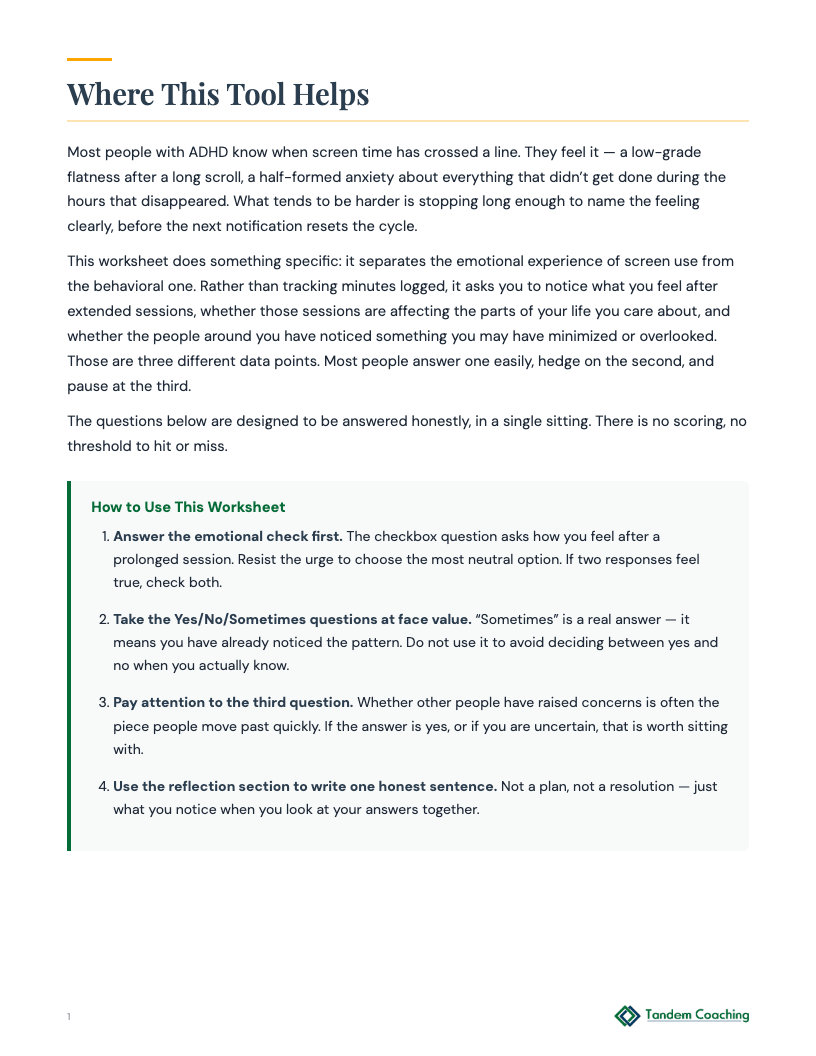
A client senses their screen use is problematic but hasn't examined the emotional experience of it
A client wants to separate how screen use feels from how much time they spend on it
A client has had others raise concerns about their screen habits and wants to examine that honestly
How to Introduce This Tool Plus
This worksheet asks something most screen-time tools don't: how do you actually feel after a long session? Not how much time you spent - how does it land emotionally. Those three questions together usually surface something worth looking at.
Browse All Pages
Tool Classification
Domain
ADHD
Type
Worksheet
Phase
Discovery
Reflection
Details
15 min
Between sessions
Topics
Emotions
Habits
Identity
For the Coaching Practitioner
Plus
Coaching Scenarios
Plus
1 When the Client Is Defensive About Screen Use ▶
Context
A client with ADHD who works in digital marketing uses screens for most of their work and personal life. They have come to coaching with a goal related to focus, not screen time, but initial conversations have revealed that they are using screens in ways that conflict with their stated values - scrolling at family dinner, checking work messages in bed, watching videos instead of sleeping. The client becomes defensive when screen time is raised, arguing that their screen use is necessary for their job and that reducing it is not realistic.
How to Introduce
Do not introduce this as a screen time evaluation tool. Frame it as a feelings mapping exercise: 'This is not about how much you use screens. It's about how you feel during and after different types of use. The data might tell us something useful, or it might not - but let's look before we decide.' The emotional impact columns (during/after) are less threatening than a usage-volume tool because they start from the client's own experience rather than an external judgment about their behavior. If the client is still resistant, make it fully optional: 'If this feels like the wrong direction, we can put it aside. What would you rather look at?'
What to Watch For
Watch for the client rating all screen use as feeling 'fine' or 'neutral' regardless of context - work email, social media, news, video - with no differentiation. Uniform positive ratings suggest the client is performing nonchalance rather than actually reflecting. Ask about a specific type of use: 'When you are scrolling social media at 11pm and you close the app - what do you usually feel in the three minutes after?' The specificity often breaks through the defensive flatness. Also watch for the client conflating work-related screen use with personal screen use - mixing the two prevents the worksheet from surfacing what is actually worth examining.
Debrief
Start with the types of use that produced negative after-feelings. Do not editorialize - read back what the client wrote: 'You noted that after late-night social scrolling you usually feel [what they wrote]. What do you make of that?' Let the client interpret their own data before offering any frame. The worksheet's value is that it is the client's own words, not the coach's assessment. Then move to any types of screen use that produced positive feelings: 'What's different about those?' The contrast between the two lists is where the coaching conversation belongs - not in a debate about whether screen use is good or bad.
Flags
- Moderate
Client's after-feelings for most screen use are consistently negative (emptiness, guilt, self-disgust) but they report being unable to stop even when they want to - not a willpower issue but a compulsive quality to the use
Response: Compulsive screen use with consistent negative after-feelings and inability to stop despite wanting to may indicate behavioral addiction patterns that warrant clinical support. Name what you are observing: 'You've described wanting to stop and not being able to - that quality of use is worth exploring with a therapist or specialist in behavioral patterns alongside what we do here.'
2 Separating Work Screen Use from Avoidance Screen Use ▶
Context
A client with ADHD who is a freelance consultant uses screens for all their billable work and also to avoid billable work. They cannot accurately distinguish how much of their screen time is productive and how much is avoidance. They routinely lose the second half of their work day to passive screen consumption and bill fewer hours than they need to meet financial goals. Their stated coaching goal is income growth, but the behavioral pattern is screen-use-as-avoidance.
How to Introduce
Frame this as building category awareness: 'Right now all screen time looks the same. This exercise asks you to distinguish the types by how they feel - because work email and avoidance scrolling feel different even if they look identical from the outside.' The key distinction for this client is not work vs. personal use but engaged vs. disengaged use. An engaged work task feels different before, during, and after than disengaged scrolling. The worksheet's 'Before' column is particularly important for this client: 'What were you trying to do when you picked up your phone/opened that tab?' The answer reveals whether the screen use was intentional or automatic.
What to Watch For
Watch for the client conflating 'work-adjacent' screen use with work - reading articles about client industries, researching tools they might use someday, reviewing content from clients. These activities feel productive and are very difficult for the client to honestly rate as avoidance, but they may be functioning as high-status avoidance. Ask: 'When you were reading that article, did it produce a deliverable or advance a specific project? Or did it feel more like staying in motion without moving forward?'
Debrief
Map the client's day in two segments - morning and afternoon - and look at where the screen use types shift. Most clients with this pattern have a clear inflection point in the afternoon where intentional screen use gives way to avoidance screen use. Finding that inflection point is the first coaching target: 'What happens at that point that makes the shift? Is it a specific task you are avoiding, an energy drop, something else?' The worksheet data reveals the shape of the problem; the debrief identifies the trigger for the shift.
Flags
- Low
Client's avoidance screen use is consistently tied to specific types of work tasks - any task involving writing, any task involving client communication, any task involving financial management
Response: Task-specific avoidance is useful diagnostic data. The avoidance is telling you what feels most threatening. Name the pattern and make it a coaching focus: not 'reduce screen time' but 'understand what makes [the avoided task type] harder to start than others.' The screen use is a symptom; the avoided task type is the topic.
3 EF-Interaction: Mapping Screen Use to Emotional States ▶
Context
A client with ADHD who is a nurse manager has noticed that their off-hours screen use spikes after difficult shifts - high patient load, conflict with physicians, understaffing. They do not experience this as a conscious decision but as something that just happens when they get home. They want to understand the pattern well enough to create a different off-hours recovery routine.
How to Introduce
Frame this as emotion-to-behavior mapping rather than screen time reduction: 'We are trying to understand what the screen is doing for you after a hard shift. Once we know what it is providing, we can look at whether there are other ways to get the same thing.' The ADHD dimension here is important: emotional dysregulation in ADHD tends to be more intense and slower to recover than in neurotypical adults. Screen use after dysregulating events is often serving a self-regulation function - numbing, stimulation, or escape. Name this without pathologizing it: 'For a lot of people with ADHD, screens after a hard day are doing the same work that other coping mechanisms do. That's not a character flaw - it's a regulatory strategy. The question is whether it's the best available one.'
What to Watch For
Watch for the client's 'after' feelings being ambivalent rather than clearly negative - 'I feel kind of okay but also like I wasted the evening.' This ambivalence is actually useful: it means the screen use is providing some genuine relief, but at a cost. Do not position this as straightforwardly bad. Ask: 'What does the screen use give you that you need after those shifts?' The answer (rest, escape, connection, stimulation) is the coaching target - not elimination of screen use but finding alternatives that provide the same thing without the cost.
Debrief
Start by mapping shift difficulty against screen use patterns: 'Looking at your entries, do you see a correlation between how hard the shift was and how much you used screens that evening?' The client usually already knows the answer but has not made it explicit. Once the correlation is named, move to recovery: 'What did you most need after those hard shifts?' Then: 'Is screen use actually giving you that, or is it giving you something adjacent to it while the actual need goes unmet?' The gap between what the screen provides and what the client actually needs is where the alternative recovery strategies live.
Flags
- Moderate
Client describes the nursing environment as consistently traumatic - not just difficult but involving repeated exposure to patient deaths, violence, or severe trauma - and the screen use is the primary or only coping mechanism they have
Response: Healthcare workers with repeated exposure to traumatic events need trauma-informed support that coaching cannot provide. Acknowledge the work environment directly: 'What you're describing at work is a lot to carry. I want to make sure you have appropriate support for that - not just a better recovery routine. Do you have access to any mental health support through your employer?' Continue coaching on what is within scope while naming the limits clearly.
Tool Flow
Plus
Requires
- None - standalone tool
→
Produces
- emotional impact rating of extended screen sessions
- honest answer on whether screen use is affecting life areas
- written one-sentence observation from combined answers
Pairs Well With
ADHD
Trigger and Response Options
A client is not clear on what specifically triggers their emotional reactivity
Why it pairsOnce a client names the emotions screen use triggers, this checklist helps them match those specific emotional states to coping strategies they can actually reach for.
ADHDDaily Mental Health Tracker
A client has no consistent picture of their daily mental health patterns
Why it pairsUse this after the worksheet so the client can track whether mood, sleep, and energy shift on days when screen use changes - turning a one-time observation into a week of data.
ADHDOpposite Actions Worksheet
A client's emotional reactions are driving behaviors that make the situation worse
Why it pairsThe emotional impact rating from the worksheet feeds directly into this tool's emotion-to-behavior map, giving the client concrete opposite actions for the feelings screen use produces.
Related Articles


ADHD & Emotional Intelligence in Leadership
Read article →
Coaching Session Blueprints: What ADHD-Informed Executive Coaching Really Looks Like
Read article →
ADHD Coaching Certification: Which Path Actually Counts
Read article →
ADHD Time Blindness at Work: Why I Underestimate Time
Read article →